Set up your tag
About two minutes. Four short steps, big buttons, and you can always go back. Have your phone and the packaging. The 6-digit PIN is on the card underneath your Tapcessory tag.
Tap the tag
Hold the top of your phone against the tag. Setup opens by itself, no app. On Android, NFC must be on. No tap? Type the code from the card instead.
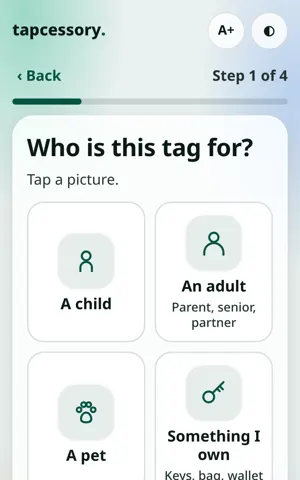
Who is it for?
Choose a child, an adult, a pet, or something you own.
Their name, and a photo if you like
A first name is enough. The photo is optional.
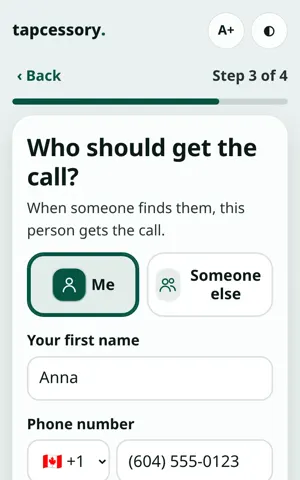
Who gets the call
One screen: the name and phone number to call, your email (already signed in? just confirm it), and an optional switch to get a text when the tag is tapped. You can add a second person.
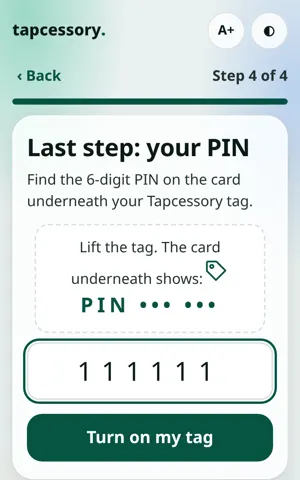
The PIN, last
Find the 6-digit PIN on the card underneath your Tapcessory tag, then tap “Turn on my tag”.
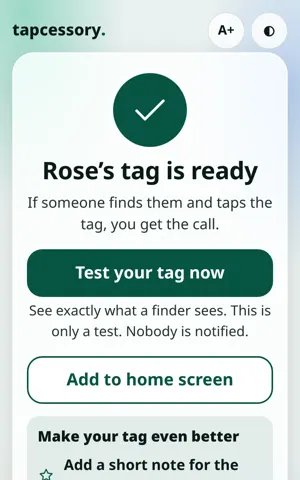
Done. Test it.
See exactly what a finder sees (nobody is notified). Then make it even better: add a short note for the finder from your dashboard.
Your answers are saved on your phone as you go, so you can stop and come back. Need a hand? Call 204-881-6610. We’ll never ask for your private editing link.
Ready when they need it.
$19.99 CAD per tag. Shipping $2.50, free on 3 or more.
Buy now- No app
- No battery
- Not a tracker
- 1-year warranty
- 30-day returns